Maze making using graphs

Introduction

This document (notebook) describes three ways of making mazes (or labyrinths) using graphs. The first two are based on rectangular grids; the third on a hexagonal grid.

All computational graph features discussed here are provided by the Graph functionalities of Wolfram Language.

TL;DR

Just see the maze pictures below. (And try to solve the mazes.)

Procedure outline

The first maze is made by a simple procedure which is actually some sort of cheating:

  • A regular rectangular grid graph is generated with random weights associated with its edges.
  • The (minimum) spanning tree for that graph is found.
  • That tree is plotted with exaggeratedly large vertices and edges, so the graph plot looks like a maze.
    • This is “the cheat” — the maze walls are not given by the graph.

The second maze is made “properly”:

  • Two interlacing regular rectangular grid graphs are created.
  • The second one has one less row and one less column than the first.
  • The vertex coordinates of the second graph are at the centers of the rectangles of the first graph.
  • The first graph provides the maze walls; the second graph is used to make paths through the maze.
    • In other words, to create a solvable maze.
  • Again, random weights are assigned to edges of the second graph, and a minimum spanning tree is found.
  • There is a convenient formula that allows using the spanning tree edges to remove edges from the first graph.
  • In that way, a proper maze is derived.

The third maze is again made “properly” using the procedure above with two modifications:

  • Two interlacing regular grid graphs are created: one over a hexagonal grid, the other over a triangular grid.
    • The hexagonal grid graph provides the maze walls; the triangular grid graph provides the maze paths.
  • Since the formula for wall removal is hard to derive, a more robust and universal method based on nearest neighbors is used.

Simple Maze

In this section, we create a simple, “cheating” maze.

Remark: The steps are easy to follow, given the procedure outlined in the introduction.

RandomSeed[3021];
{n, m} = {10, 25};
g = GridGraph[{n, m}];
gWeighted = Graph[VertexList[g], UndirectedEdge @@@ EdgeList[g], EdgeWeight -> RandomReal[{10, 1000}, EdgeCount[g]]];
Information[gWeighted]

0s0wsdfzitdzq

Find the spanning tree of the graph:

mazeTree = FindSpanningTree[gWeighted];

Shortest path from the first vertex (bottom-left) to the last vertex (top-right):

path = FindShortestPath[mazeTree, 1, n*m];
Length[path]

Out[]= 46

Graph plot:

simpleMaze = Graph[VertexList[mazeTree], EdgeList[mazeTree], VertexCoordinates -> GraphEmbedding[g]];
 simpleMaze2 = EdgeAdd[simpleMaze, {"start" -> 1, Max[VertexList[simpleMaze]] -> "end"}];
 Clear[vf1, ef1];
 vf1[col_?ColorQ][{xc_, yc_}, name_, {w_, h_}] := {col, EdgeForm[None],Rectangle[{xc - w, yc - h}, {xc + w, yc + h}]};
 ef1[col_?ColorQ][pts_List, e_] := {col, Opacity[1], AbsoluteThickness[22], Line[pts]};
 grCheat = GraphPlot[simpleMaze2, VertexSize -> 0.8, VertexShapeFunction -> vf1[White], EdgeShapeFunction -> ef1[White], Background -> DarkBlue, ImageSize -> 800, ImagePadding -> 0];
 range = MinMax /@ Transpose[Flatten[List @@@ Cases[grCheat, _Rectangle, \[Infinity]][[All, All]], 1]];
 Show[grCheat, PlotRange -> range]

1bc8vj9fmf5ro

The “maze” above looks like a maze because the vertices and edges are rectangular with matching sizes, and they are thicker than the spaces between them. In other words, we are cheating.

To make that cheating construction clearer, let us plot the shortest path from the bottom left to the top right and color the edges in pink (salmon) and the vertices in red:

gPath = PathGraph[path, VertexCoordinates -> GraphEmbedding[g][[path]]];
Legended[
   Show[
    grCheat, 
    Graph[gPath, VertexSize -> 0.7, VertexShapeFunction -> vf1[Red], EdgeShapeFunction -> ef1[Pink], Background -> DarkBlue, ImageSize -> 800, ImagePadding -> 0], 
    PlotRange -> range 
   ], 
   SwatchLegend[{Red, Pink, DarkBlue}, {"Shortest path vertices", "Shortest path edges", "Image background"}]]

1q29onggyuwcc

Proper Maze

proper maze is a maze given with its walls (not with the space between walls).

Remark: For didactical reasons, the maze in this section is small so that the steps—outlined in the introduction—can be easily followed.

Make two regular graphs: one for the maze walls and the other for the maze paths.

{n, m} = {6, 12};
g1 = GridGraph[{n, m}, VertexLabels -> "Name"];
g1 = VertexReplace[g1, Thread[VertexList[g1] -> Map[w @@ QuotientRemainder[# - 1, n] &, VertexList[g1]]]];
g2 = GridGraph[{n - 1, m - 1}];
g2 = VertexReplace[g2, Thread[VertexList[g2] -> Map[QuotientRemainder[# - 1, n - 1] &, VertexList[g2]]]];
g2 = Graph[g2, VertexLabels -> "Name", VertexCoordinates -> Map[# + {1, 1}/2 &, GraphEmbedding[g2]]];
Grid[{{"Wall graph", "Paths graph"}, {Information[g1], Information[g2]}}]

0t91asf2eugz2

See how the graph “interlace”:

(*Show[g1,HighlightGraph[g2,g2],ImageSize->800]*)

Maze Path Graph:

mazePath = Graph[EdgeList[g2], EdgeWeight -> RandomReal[{10, 10000}, EdgeCount[g2]]];
mazePath = FindSpanningTree[mazePath, VertexCoordinates -> Thread[VertexList[g2] -> GraphEmbedding[g2]]];
Information[mazePath]

0t91asf2eugz2

Combined Graph:

g3 = Graph[
     Join[EdgeList[g1], EdgeList[mazePath]], VertexCoordinates -> Join[Thread[VertexList[g1] -> GraphEmbedding[g1]], Thread[VertexList[mazePath] -> GraphEmbedding[mazePath]]], 
     VertexLabels -> "Name"];
Information[g3]

0mdi2hih68mqo

Plot the combined graph:

HighlightGraph[g3, mazePath, ImageSize -> 800]

1kndzl5jned4z

Remove wall edges using a formula:

g4 = Graph[g3, VertexLabels -> None]; 
  
Do[{i, j} = e[[1]]; 
      {i2, j2} = e[[2]]; 
      If[i2 < i || j2 < j, {{i2, j2}, {i, j}} = {{i, j}, {i2, j2}}]; 
      
     (*Horizontal*) 
      If[i == i2 && j < j2, 
       g4 = EdgeDelete[g4, UndirectedEdge[w[i2, j2], w[i2 + 1, j2]]] 
      ]; 
      
     (*Vertical*) 
      If[j == j2 && i < i2, 
       g4 = EdgeDelete[g4, UndirectedEdge[w[i2, j2], w[i2, j2 + 1]]] 
      ]; 
     , {e, EdgeList[mazePath]}]; 
  
Information[g4]

0s9eo0feadbo8

Plot wall graph and maze paths (maze space) graph:

HighlightGraph[g4, mazePath, ImageSize -> 800]

05ekkh85mpfro

Fancier maze presentation with rectangular vertices and edges (with matching sizes):

g5 = Subgraph[g4, VertexList[g1]];
g5 = VertexDelete[g5, {w[0, 0], w[m - 1, n - 1]}];
g6 = Graph[g5, VertexShapeFunction -> None, EdgeShapeFunction -> ({Opacity[1], DarkBlue, AbsoluteThickness[30], Line[#1]} &), ImageSize -> 800]

0arq97krotgni

Here is how a solution can found and plotted:

(*solution=FindPath[#,VertexList[#][[1]],VertexList[#][[-1]]]&@mazePath;
 Show[g6,HighlightGraph[Subgraph[mazePath,solution],Subgraph[mazePath,solution]]]*)

Here is a (more challenging to solve) maze generated with $n=12$ and $m=40$:

1tmgs2lmz563k

Hexagonal Version

Let us create another maze based on a hexagonal grid. Here are two grid graphs:

  • The first is a hexagonal grid graph representing the maze’s walls.
  • The second graph is a triangular grid graph with one fewer row and column, and shifted vertex coordinates.
{n, m} = {6, 14}*2; 
g1 = ResourceFunction["HexagonalGridGraph"][{m, n}]; 
g1 = VertexReplace[g1, Thread[VertexList[g1] -> (w[#1] & ) /@ VertexList[g1]]]; 
g2 = ResourceFunction["https://www.wolframcloud.com/obj/antononcube/DeployedResources/Function/TriangularLatticeGraph/"][{n - 1, m - 1}]; 
g2 = Graph[g2, VertexCoordinates -> (#1 + {Sqrt[3], 1} & ) /@ GraphEmbedding[g2]]; 
{Information[g1], Information[g2]}

0eyicaepipiwo
Show[g1, HighlightGraph[g2, g2], ImageSize -> 800]

0bfc3uk2c4uw3

Maze Path Graph:

mazePath = Graph[EdgeList[g2], EdgeWeight -> RandomReal[{10, 10000}, EdgeCount[g2]]];
 mazePath = FindSpanningTree[mazePath, VertexCoordinates -> Thread[VertexList[g2] -> GraphEmbedding[g2]]];
 Information[mazePath]

0937puga1ahjz

Combine the walls-maze and the maze-path graphs (i.e., make a union of them), and plot the resulting graph:

g3 = GraphUnion[g1, mazePath, VertexCoordinates -> Join[Thread[VertexList[g1] -> GraphEmbedding[g1]], Thread[VertexList[mazePath] -> GraphEmbedding[mazePath]]]];
 Information[g3]

1foiaesyk9d5s
HighlightGraph[g3, mazePath, ImageSize -> 800]

1t4t24o8zwj7p

Make a nearest neighbor points finder functor:

finder = Nearest[Thread[GraphEmbedding[g1] -> VertexList[g1]]]

045ypuvgpbrq4

Take a maze edge and its vertex points:

e = First@EdgeList[mazePath];
aMazePathCoords = Association@Thread[VertexList[mazePath] -> GraphEmbedding[mazePath]];
 points = List @@ (e /. aMazePathCoords)

17k4mshnxw0tf

Find the edge’s midpoint and the nearest wall-graph vertices:

Print["Middle edge point: ", Mean[points]]
Print["Edge to remove: ", UndirectedEdge @@ finder[Mean[points]]]

0b52fvogi84bf
1xlaj83jf90c6

Loop over all maze edges, removing wall-maze edges:

g4 = g1;
Do[
    points = Map[aMazePathCoords[#] &, List @@ e]; 
     m = Mean[points]; 
     vs = finder[m]; 
     g4 = EdgeDelete[g4, UndirectedEdge @@ vs]; 
    , {e, EdgeList[mazePath]}] 
  
Information[g4]

11uvhhgtj2da4

Here is the obtained graph

Show[g4, ImageSize -> 800]

0zih3bdnlu25c

The start and end points of the maze:

aVertexCoordinates = Association@Thread[VertexList[g4] -> GraphEmbedding[g4]];
{start, end} = Keys[Sort[aVertexCoordinates]][[{1, -1}]]

Out[]= {w[1], w[752]}

Finding the Maze Solution:

Out[]= Sequence[1, 240]

solution = FindShortestPath[mazePath, Sequence @@ Keys[Sort[aMazePathCoords]][[{1, -1}]]];
solution = PathGraph[solution, VertexCoordinates -> Lookup[aMazePathCoords, solution]];

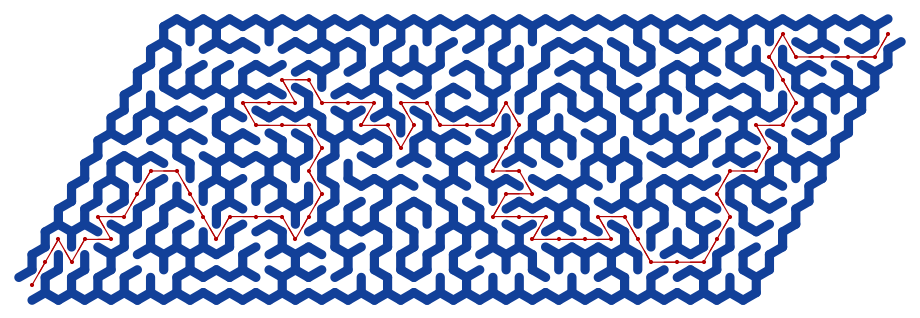
Plot the maze:

g5 = Graph[g4, VertexShapeFunction -> None, EdgeShapeFunction -> ({Opacity[1], DarkBlue, AbsoluteThickness[8], Line[#1]} &), ImageSize -> 800];
g5 = VertexDelete[g5, {start, end}]

0lpxgk7luqu30

Here is the solution of the maze:

Show[g5, HighlightGraph[solution, solution]]


Additional Comments


References

Articles, Blog Posts

[AA1] Anton Antonov, “Day 24 — Maze Making Using Graphs”, (2025), Raku Advent Calendar at WordPress .

Functions

[AAf1] Anton Antonov, TriangularLatticeGraph, (2025), Wolfram Function Repository.

[EWf1] Eric Weisstein, TriangularGridGraph, (2020), Wolfram Function Repository.

[WRIf1] Wolfram Research, HexagonalGridGraph, (2020), Wolfram Function Repository.

Packages

[AAp1] Anton Antonov, Graph, Raku package , (2024–2025), GitHub/antononcube .

[AAp2] Anton Antonov, Math::Nearest, Raku package , (2024), GitHub/antononcube .

Numerically 2026 is unremarkable yet happy

… and has primitive roots

Introduction

This document (notebook) discusses number theory properties and relationships of the integer 2026.

The integer 2026 is semiprime and a happy number, with 365 as one of its primitive roots. Although 2026 may not be particularly noteworthy in number theory, this provides a great excuse to create various elaborate visualizations that reveal some interesting aspects of the number.

Setup

(*PacletInstall[AntonAntonov/NumberTheoryUtilities]*)
   Needs["AntonAntonov`NumberTheoryUtilities`"]

2026 Is a Happy Semiprime with Primitive Roots

First, 2026 is obviously not prime—it is divisible by 2 —but dividing it by 2 gives a prime, 1013:

PrimeQ[2026/2]

Out[]= True

Hence, 2026 is a semiprime . The integer 1013 is not a Gaussian prime , though:

PrimeQ[1013, GaussianIntegers -> True]

Out[]= False

happy number is a number for which iteratively summing the squares of its digits eventually reaches 1 (e.g., 13 -> 10 -> 1). Here is a check that 2026 is happy:

ResourceFunction["HappyNumberQ"][2026]

Out[]= True

Here is the corresponding trail of digit-square sums:

FixedPointList[Total[IntegerDigits[#]^2] &, 2026]

Out[]= {2026, 44, 32, 13, 10, 1, 1}

Not many years in this century are happy numbers:

Pick[Range[2000, 2100], ResourceFunction["HappyNumberQ"] /@ Range[2000, 2100]]

Out[]= {2003, 2008, 2019, 2026, 2030, 2036, 2039, 2062, 2063, 2080, 2091, 2093}

The decomposition of $2026$ as $2 * 1013$ means the multiplicative group modulo $2026$ has primitive roots. A primitive root exists for an integer $n$ if and only if $n$ is $1$, $2$,$4$, $p^k$ , or $2 p^k$ , where $k$ is an odd prime and $k>0$ .

We can check additional facts about 2026, such as whether it is “square-free” , among other properties. However, let us compare these with the feature-rich 2025 in the next section.

Comparison with 2025

Here is a side-by-side comparison of key number theory properties for 2025 and 2026.

Property20252026Notes
Prime or CompositeCompositeCompositeBoth non-prime.
Prime Factorization3^4 * 5^2 (81 * 25)2 * 10132025 has repeated small primes; 2026 is a semiprime (product of two distinct primes).
Number of Divisors15 (highly composite for its size)4 (1, 2, 1013, 2026)2025 has many divisors; 2026 has very few.
Perfect SquareYes (45^2 = 2025)NoMajor highlight for 2025—rare square year.
Sum of CubesYes (1^3 + 2^3 + … + 9^3 = (1 + … + 9)^2 = 2025)NoIconic property for 2025 (Nicomachus’s theorem).
Happy NumberNo (process leads to cycle including 4)Yes (repeated squared digit sums reach 1)Key point for 2026—its main “happy” trait.
Harshad NumberYes (divisible by 9)No (not divisible by 10)2025 qualifies; 2026 does not.
Primitive RootsNoYesThis is a relatively rare property to have.
Other Notable Traits{(20 + 25)^2 = 2025, Sum of first 45 odd numbers, Deficient number, Many pattern-based representations}{Even number, Deficient number, Few special patterns}2025 is packed with elegant properties; 2026 is more “plain” beyond being happy.
Overall “Interest” LevelHighly interesting—celebrated in math communities for squares, cubes, and patternsRelatively uninteresting—basic semiprime with no standout geometric or sum propertiesReinforces blog’s angle.

To summarize:

  • 2025 stands out as a mathematically rich number, often highlighted in puzzles and articles for its perfect square status and connections to sums of cubes and odd numbers.
  • 2026 , in contrast, has fewer flashy properties — it’s a straightforward even semiprime — but it qualifies as a happy number and it has a primitive root.

Here is a computationally generated comparison table of most of the properties found in the table above:

Dataset@Map[<|"Function" -> #1, "2025" -> #1[2025], "2026" -> #1[2026]|> &, {PrimeQ, CompositeQ, Length@*Divisors, PrimeOmega, EulerPhi, SquareFreeQ, ResourceFunction["HappyNumberQ"],ResourceFunction["HarshadNumberQ"], ResourceFunction["DeficientNumberQ"], PrimitiveRoot}]

Function20252026
PrimeQFalseFalse
CompositeQTrueTrue
-Composition-154
PrimeOmega62
EulerPhi10801012
SquareFreeQFalseTrue
-ResourceFunction-FalseTrue
-ResourceFunction-TrueFalse
-ResourceFunction-TrueTrue
PrimitiveRoot-PrimitiveRoot-3

Phi Number System

Digits of 2026 represented in the Phi number system :

ResourceFunction["PhiNumberSystem"][2026]

Out[]= {15, 13, 10, 6, -6, -11, -16}

Verification:

Total[GoldenRatio^%] // RootReduce

Out[]= 2026

Happy Numbers Trail Graph

Let us create and plot a graph showing the trails of all happy numbers less than or equal to 2026. Below, we identify these numbers and their corresponding trails:

ns = Range[2, 2026];
 AbsoluteTiming[
   trails = Map[FixedPointList[Total[IntegerDigits[#]^2] &, #, 100, SameTest -> (Abs[#1 - #2] < 1*^-10 &)] &, ns]; 
  ]

Out[]= {0.293302, Null}

Here is the corresponding trails graph, highlighting the primes and happy numbers:

happy = First /@ Select[trails, #[[-1]] == 1 &];
 primeToo = Select[happy, PrimeQ];
 joyfulToo = Select[happy, ResourceFunction["HarshadNumberQ"]];
 aColors = Flatten@{Thread[primeToo -> ResourceFunction["HexToColor"]["#006400"]],2026 -> Blue, Thread[joyfulToo -> ResourceFunction["HexToColor"]["#fbb606ff"]], _ -> ResourceFunction["HexToColor"]["#B41E3A"]};
 edges = DeleteDuplicates@Flatten@Map[Rule @@@ Partition[Most[#], 2, 1] &, Select[trails, #[[-1]] == 1 &]];
 vf1[{xc_, yc_}, name_, {w_, h_}] := {(name /. aColors), EdgeForm[name /. aColors], Rectangle[{xc - 2 w, yc - h}, {xc + 2 w, yc + h}], Text[Style[name, 12, White], {xc, yc}]}
 vf2[{xc_, yc_}, name_, {w_, h_}] := {(name /. aColors), EdgeForm[name /. aColors], Disk[{xc, yc}, {2 w, h}], Text[Style[name, 12, White], {xc, yc}]} 
  
 gTrails = 
   Graph[
    edges, 
    VertexStyle -> ResourceFunction["HexToColor"]["#B41E3A"], VertexSize -> 1.8, 
    VertexShapeFunction -> vf2, 
    EdgeStyle -> Directive[ResourceFunction["HexToColor"]["#B41E3A"]], 
    EdgeShapeFunction -> ({ResourceFunction["HexToColor"]["#B41E3A"], Thick, BezierCurve[#1]} &), 
    DirectedEdges -> False, 
    GraphLayout -> "SpringEmbedding", 
    ImageSize -> 1200]

Triangular Numbers

There is a theorem by Gauss stating that any integer can be represented as a sum of at most three triangular numbers. Here we find an “interesting” solution:

sol = FindInstance[{2026 == PolygonalNumber[i] + PolygonalNumber[j] + PolygonalNumber[k], i > 10, j > 10, k > 10}, {i, j, k}, Integers]

Out[]= {{i -> 11, j -> 19, k -> 59}}

Here, we verify the result:

Total[PolygonalNumber /@ sol[[1, All, 2]]]

Out[]= 2026

Chord Diagrams

Here is the number of primitive roots of the multiplication group modulo 2026:

PrimitiveRootList[2026] // Length

Out[]= 440

Here are chord plots [AA2, AAp1, AAp2, AAv1] corresponding to a few selected primitive roots:

Row@Map[Labeled[ChordTrailsPlot[2026, #, PlotStyle -> {AbsoluteThickness[0.01]}, ImageSize -> 400], #] &, {339, 365, 1529}]

Remark: It is interesting that 365 (the number of days in a common calendar year) is a primitive root of the multiplicative group generated by 2026 . Not many years have this property this century; many do not have primitive roots at all.

Pick[Range[2000, 2100], Map[MemberQ[PrimitiveRootList[#], 365] &, Range[2000, 2100]]]

Out[]= {2003, 2026, 2039, 2053, 2063, 2078, 2089}

Quartic Graphs

The number 2026 appears in 18 results of the search “2026 graphs” in «The On-line Encyclopedia of Integer Sequences» . Here is the first result (from 2025-12-17): A033483 , “Number of disconnected 4-valent (or quartic) graphs with n nodes.” Below, we retrieve properties from A033483’s page:

ResourceFunction["OEISSequenceData"]["A033483", "Dataset"][{"IDNumber","IDString", "Name", "Sequence", "Offset"}]

IDNumberIDStringNameSequenceOffset
33483A033483Number of disconnected 4-valent (or quartic) graphs with n nodes.{0, 0, 0, 0, 0, 0, 0, 0, 0, 0, 1, 1, 3, 8, 25, 88, 378, 2026, 13351, 104595, 930586, 9124662, 96699987, …}0

Here, we just get the title:

ResourceFunction["OEISSequenceData"]["A033483", "Name"]

Out[]= "Number of disconnected 4-valent (or quartic) graphs with n nodes."

Here, we get the corresponding sequence:

seq = ResourceFunction["OEISSequenceData"]["A033483", "Sequence"]

Out[]= {0, 0, 0, 0, 0, 0, 0, 0, 0, 0, 1, 1, 3, 8, 25, 88, 378, 2026, 13351, 104595, 930586, 9124662, 96699987, 1095469608, 13175272208, 167460699184, 2241578965849, 31510542635443, 464047929509794, 7143991172244290, 114749135506381940, 1919658575933845129, 33393712487076999918, 603152722419661386031}

Here we find the position of 2026 in that sequence:

Position[seq, 2026]

Out[]= {{18}}

Given the title of the sequence and the extracted position of $2026$ , this means that the number of disconnected 4-regular graphs with 17 vertices is $2026$. ($17$ because the sequence offset is $0$.) Let us create a few graphs from that set by using the 5-vertex complete graph $\left(K_5\right.$) and circulant graphs . Here is an example of such a graph:

g1 = Fold[GraphUnion, CompleteGraph[5], {IndexGraph[CompleteGraph[5], 6], IndexGraph[CirculantGraph[7, {1, 2}], 11]}];
GraphPlot[g1, VertexLabels -> "Name", PlotTheme -> "Web", ImagePadding -> 10]

And here is another one:

g2 = GraphUnion[CirculantGraph[12, {1, 5}], IndexGraph[CompleteGraph[5], 13]];
GraphPlot[g1, VertexLabels -> "Name", PlotTheme -> "Web", ImagePadding -> 10]

Here, we check that all vertices have degree 4:

Mean@VertexDegree[g2]

Out[]= 4

Remark: Note that although the plots show disjoint graphs, each graph plot represents a single graph object.

Additional Comments

This section has a few additional (leftover) comments.

  • After I researched and published the blog post “Numeric properties of 2025” , [AA1], in the first few days of 2025, I decided to program additional Number theory functionalities for Raku — see the package “Math::NumberTheory” , [AAp1].
  • Number theory provides many opportunities for visualizations, so I included utilities for some of the popular patterns in “Math::NumberTheory”, [AAp1] and “NumberTheoryUtilities”.
  • The number of years in this century that have primitive roots and have 365 as a primitive root is less than the number of years that are happy numbers.
  • I would say I spent too much time finding a good, suitable, Christmas-themed combination of colors for the trails graph.

References

Articles, blog posts

[AA1] Anton Antonov, “Numeric properties of 2025” , (2025), RakuForPrediction at WordPress .

[AA2] Anton Antonov, “Primitive roots generation trails” , (2025), MathematicaForPrediction at WordPress .

[AA3] Anton Antonov, “Chatbook New Magic Cells” , (2024), RakuForPrediction at WordPress .

[EW1] Eric W. Weisstein, “Quartic Graph” . From MathWorld–A Wolfram Resource .

Notebooks

[AAn1] Anton Antonov, “Primitive roots generation trails” , (2025), Wolfram Community . STAFFPICKS, April 9, 2025​.

[EPn1] Ed Pegg, “Happy 2025 =1³+2³+3³+4³+5³+6³+7³+8³+9³!” , ​Wolfram Community , STAFFPICKS, December 30, 2024​.

Functions, packages, paclets

[AAp1] Anton Antonov, Math::NumberTheory, Raku package , (2025), GitHub/antononcube .

[AAp2] Anton Antonov, NumberTheoryUtilities, Wolfram Language paclet , (2025), Wolfram Language Paclet Repository .

[AAp3] Anton Antonov, JavaScript::D3, Raku package , (2021-2025), GitHub/antononcube .

[AAp4] Anton Antonov, Graph, Raku package , (2024-2025), GitHub/antononcube .

[JFf1] Jesse Friedman, OEISSequenceData, (2019-2024), Wolfram Function Repository.

[MSf1] Michael Solami, HexToColor, (2020), Wolfram Function Repository.

[SHf1] Sander Huisman, HappyNumberQ, (2019), Wolfram Function Repository.

[SHf2] Sander Huisman, HarshadNumberQ, (2023), Wolfram Function Repository.

[WAf1] Wolfram|Alpha Math Team, DeficientNumberQ, (2020-2023), Wolfram Function Repository.

Videos

[AAv1] Anton Antonov, Number theory neat examples in Raku (Set 3) , (2025), YouTube/@AAA4prediction .